Просмотр новости
Найдите то, что Вас интересует
 Спутники
 РН
РН SpaceX
 Роскосмос
 NASA
NASA
СпутникиРНSpaceXРоскосмосNASAKeeping the correct time on your computer is essential because Computers apply a timestamp to the files and folders you create. You will also not be able to use some software and tools that require internet-based authorization if your system time is too far off from the current time. If you set the clock incorrectly, […]
The post Update Time v1.4 first appeared on Sordum.org.

Keeping the correct time on your computer is essential because Computers apply a timestamp to the files and folders you create. You will also not be able to use some software and tools that require internet-based authorization if your system time is too far off from the current time. If you set the clock incorrectly, bad dates become a flood of erroneous information, leading to lost files, missed appointments and poor recordkeeping. Incorrect date and time settings are the most common reason for “Error Code 0x80072F8F” error, You should be able to fix this error by Correct The Date and Time.
Common Causes for Windows 11/10 Time Being Wrong
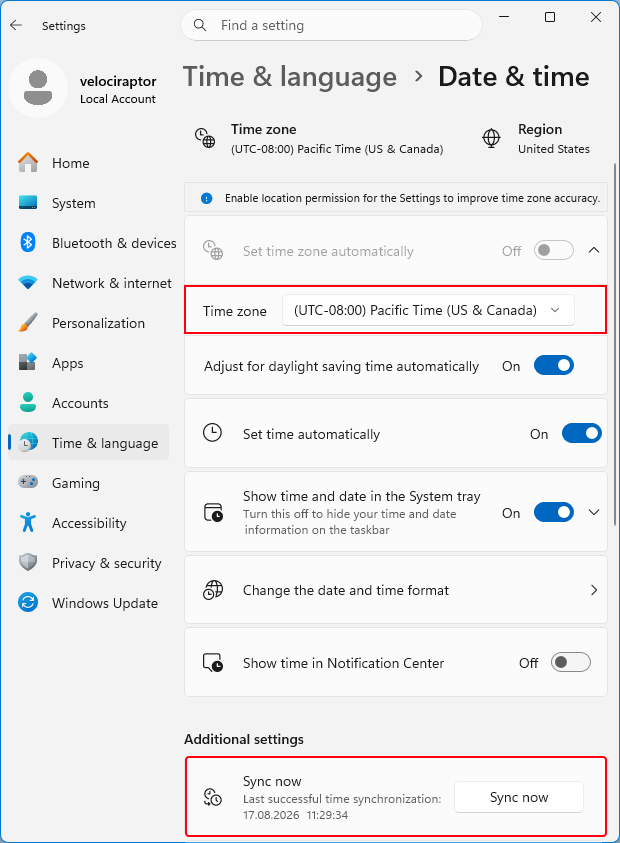
1. An Incorrect Time Zone Setting : Even if you fix the time manually, Windows will reset itself to the wrong time zone once you reboot. To fix your time zone in Windows 11/10 , call up the Run command dialog box via Windows key + R keyboard shortcut combination and execute ms-settings:dateandtime command then select the correct time zone from drop down menu (1) and use Sync Now button (2)
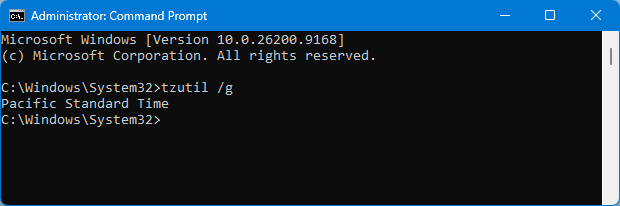
To see which time zone is currently selected, on the command line, type the first command and press Enter.
tzutil /g
tzutil /l
Second command will list all possible Time zones which you can use. To Fix your Time zone via Cmd , Type the following command to set the new time zone and press Enter:
tzutil /s “Your Time zone” for example ; tzutil /s “W. Europe Standard Time”
2. A Dead CMOS Battery : The CMOS battery sits on your computer’s motherboard and stores information about the system configuration, including the date and time. If this battery goes bad, the chip starts losing information.
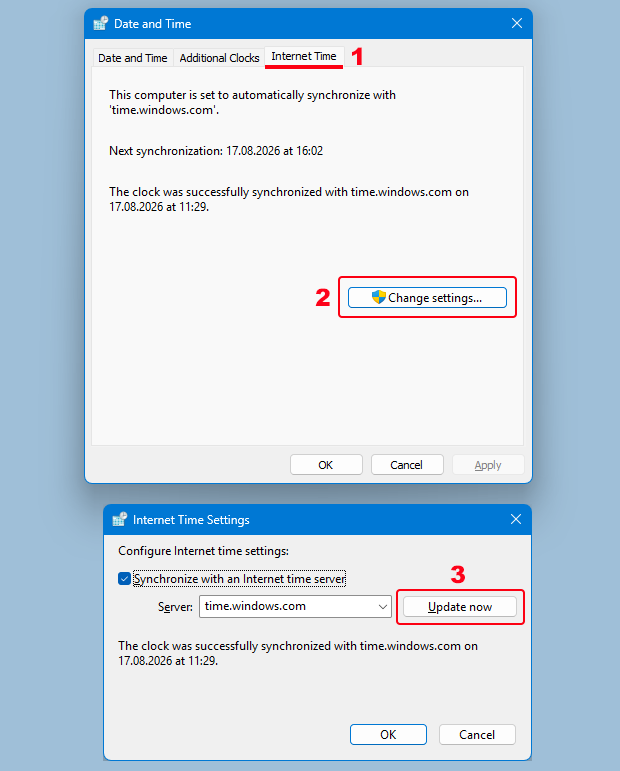
3. Windows Time Is Out of Sync : You should first confirm that your computer is syncing its clock with a valid time server. To do this, Use the “timedate.cpl” command then Click on the “Internet Time” tab (1) and Click on “Change settings…” (2) finally choose a server and use Update Now button (3)
If you want to force Windows 11/10 time to synch with a time server Press Windows key + X and select Command prompt(Admin). Type each one of the command below and press enter.
net stop w32time
w32tm /unregister
w32tm /register
net start w32time
w32tm /resync
Restart the computer to test the issue again.
4. Malware : Your computer may have been hijacked by a virus that messes with your computer time. To fix it, First, make sure your anti-virus program is up to date with the latest virus definitions. And then perform a Full computer scan in Safe mode.
5. Third-party utility or program : Third-party programs or screen savers can cause the time to stop or decrease significantly. close and disable all screen savers, and End Task all TSRs to ensure your lost time is not being caused by these programs.
How To Fix Windows 11/10 Time is Wrong Issue easily
To Fix Wrong Date & Time Issues in Windows PC you can use Update Time Software. It is portable and freeware Application. I had mainboard Issue and then I could not correct my Windows Clock , if I Shut down my computer ,Windows time stopped to working, I have replaced the CMOS battery but Problem doesn’t solved , because I have already damaged my old mainboard during the “BIOS update” for this reason I coded a small Application which called “Update Time” . It is very easy to use, just double clik on it to correct your computer Date & Time
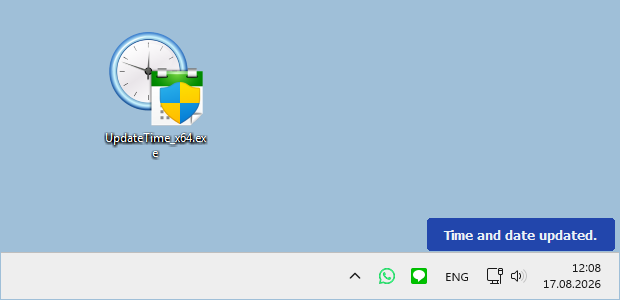
You can set Up a service to update the Time and Date at bootup too , to do this use _UpdateTime_Options.vbs in downloaded folder and tick the Appropriate checkbox
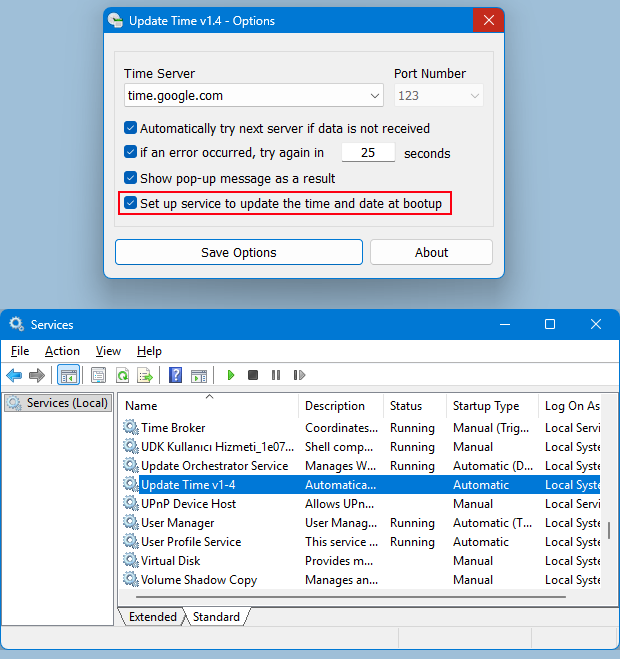
If the service is installed, it only works at Windows startup and after updating the system date and time closes itself this mean It will not work again until the next system startup (Doesn’t run in the background) .Update Time Application has Cmd parameter support , here are the supported commands
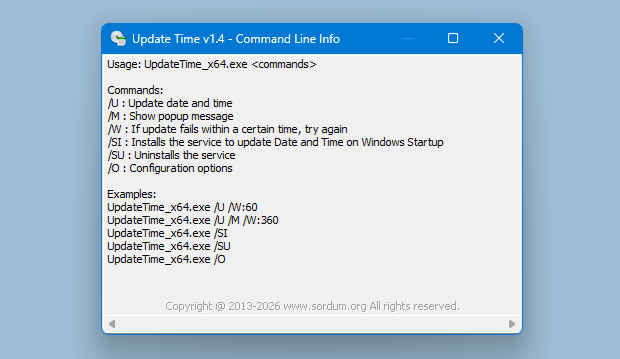
Of course, you can also run this software at startup with the help of scheduled tasks.
NOTE: If Your clock setting is updated incorrectly, please check the time zone settings.
Supported operating systems: Windows 11 , Windows 10 , Windows 8.1 , Windows 8 , Windows 7 , Windows Vista , Windows Xp – (x86 & x64)

Updated : Tuesday, August 18, 2026
File: UpdateTime_x64.exe │ Virustotal
MD5: 7585059a7b0c6054d519094b8c99ff44
SHA1: 4c4d4376fd6ebc827f0ec30a68355c1f790d059f
File: UpdateTime.exe │ Virustotal
MD5: d908ed61956da1d47116f1450d7cfb6e
SHA1: 9f37084b8ccb012512ede90202923cbda55d4c35

| # | Наименование новости | Тональность | Информативность | Дата публикации |
|---|---|---|---|---|
| 1 | URL Disabler v1.4 | 0 | 7.9 | 19-05-2026 |
| 2 | Skip UAC Prompt v1.3 | 0 | 9.32 | 16-06-2026 |
| 3 | Desktop.ini Editor v1.2 | 0 | 5.22 | 08-04-2026 |
| 4 | Bluetooth Version Finder v1.7 | 0 | 8.51 | 11-02-2026 |
| 5 | Net Disabler v1.2 | 0 | 6.67 | 26-01-2026 |
| 6 | PowerRun v1.9 (Run with highest privileges) | 0 | 5.24 | 15-07-2026 |
| 7 | Zero-Downtime AD DS Migration from Windows Server 2016 to 2025 (10-Part Series) – Part 8 | 0 | 16.06 | 19-03-2025 |
| 8 | Kriminelle nehmen aktuell Windows-Nutzer ins Visier - unbedingt updaten | -3 | 7 | 11-04-2025 |
| 9 | SUSE Python-Lxml Moderate Local File Read Threat Update 2026-2728-1 | 0 | 5 | 03-07-2026 |
| 10 | SUSE Linux Micro crun Moderate Symlink Issue Advisory 2026-22395-1 | 0 | 5 | 03-07-2026 |