Просмотр новости
Найдите то, что Вас интересует
 Спутники
 РН
РН SpaceX
 Роскосмос
 NASA
NASA
СпутникиРНSpaceXРоскосмосNASA
Learn how to remap your Mac keyboard for a tailored experience with custom shortcuts and enhanced functionality.
(via Cult of Mac - Your source for the latest Apple news, rumors, analysis, reviews, how-tos and deals.)
One of the most dramatic ways you can customize your computer is to remap your Mac keyboard keys. You can make it your own with custom functionality, powerful keyboard shortcuts and advanced features.
Using the free app Karabiner Elements, switching out one key for another is super-easy. It’s a must-have if you use a PC keyboard with your Mac. You can also go one step further, making custom keyboard shortcuts.
But if that sounds too fiddly to do yourself, you can simply install some customizations made by the Karabiner Elements community. Someone might have set up a rule for your specific keyboard!
Here’s how to get started.
How to remap Mac keyboard keys for free using Karabiner ElementsPC keyboards — and even many third-party keyboards that work with both platforms — come with a bunch of superfluous keys that Mac users don’t need. I mean, who the hell even knows what Scroll Lock does? Or Insert?
You can put those extra keys to good use. I heavily customized the layout of my keyboard, turning the whole number pad area into a selection of keys for controlling media, scrolling and adding the Globe key — a newer key that’s only found on official Apple keyboards.
Table of contents: How to remap Mac keyboard keysFirst, you need to download Karabiner Elements. This free, open source Mac app lets you heavily customize your keyboard. It also comes with a companion app, Karabiner EventViewer, that tells you the code for each key.
After downloading, follow the instructions on the installer package.
After launching the apps for the first time, you’ll have to go through and enable a bunch of system permissions. This will allow the app to monitor your keyboard input and change what happens under the hood.
I recommend going to the UI tab and turning off Karabiner Elements’ menu bar icon. I don’t like a lot of apps cluttering up my Mac’s menu bar. You can always open Karabiner Elements to make any changes.
Remap a Mac keyboard key for whatever you want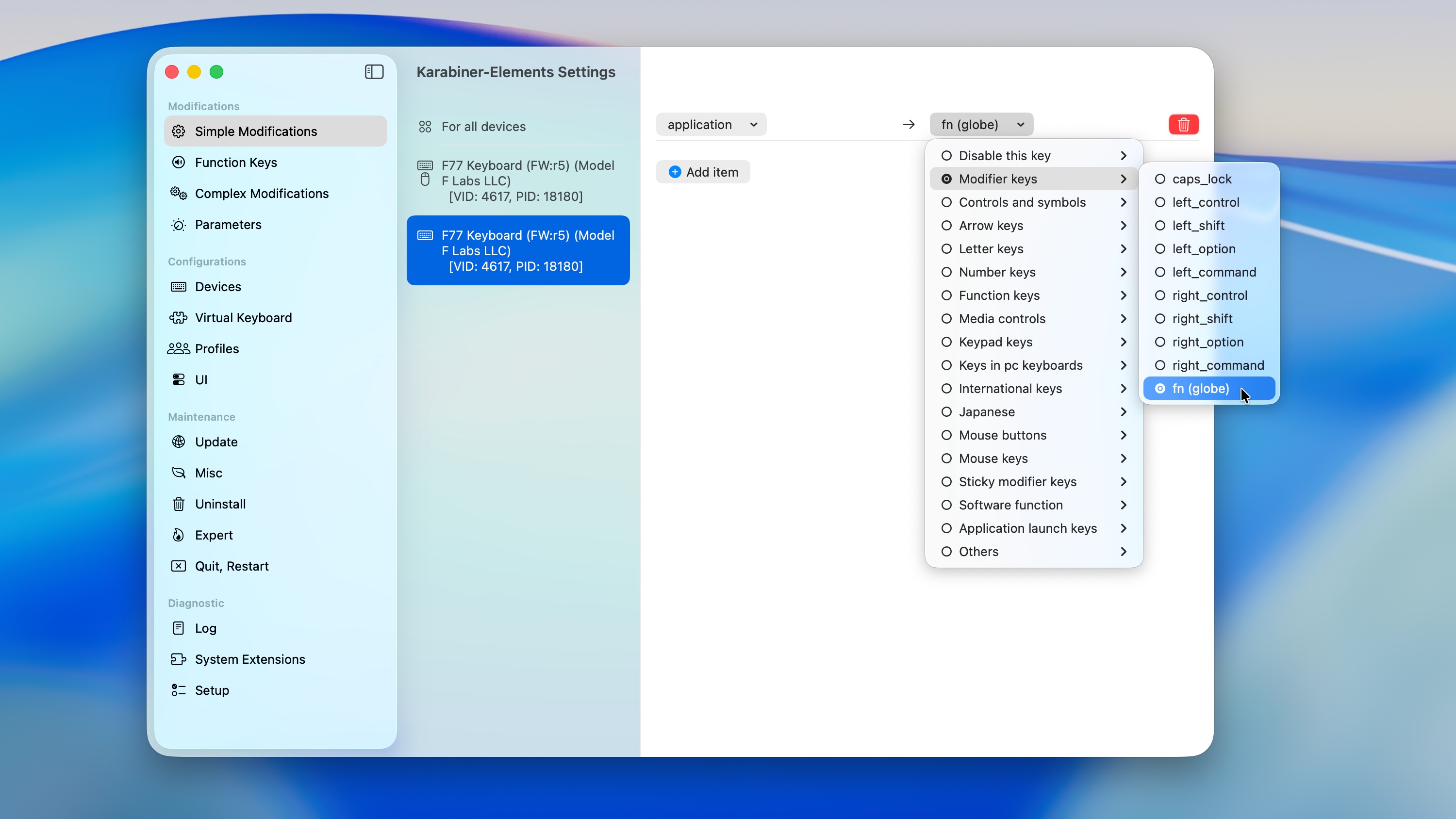 Get the Globe key back.
Open Karabiner Elements to remap your Mac keyboard keys. In the Simple Modifications tab, you can swap out one key for another. Pick For all devices if you want it to change across all keyboards, or pick one from the list below to make a change specific to that device.
In the first dropdown menu, pick the key you want to change. If you need help figuring out how it’s identified, open the Karabiner EventViewer app and press it; it’ll show the code for that key.
In the second dropdown menu, pick the key you want it to be instead.
If you have a third-party keyboard, I highly recommend mapping the Function key to the Globe key. The Globe key largely works the same way, but with extra functionality for window tiling keyboard shortcuts. You can also tap the Globe key to bring up the emoji picker. But, for inexplicable reasons, third-party keyboards can’t use it out of the box.
To make this change on an older Apple keyboard, set the left dropdown menu to Others > key_code::fn. On a third-party keyboard, you might need to use Karabiner EventViewer to see what the key shows up as. In the right dropdown menu, select Modifier keys > fn (globe). Then, you should be able to use it like a Globe key.
Make a complex shortcut with multiple keys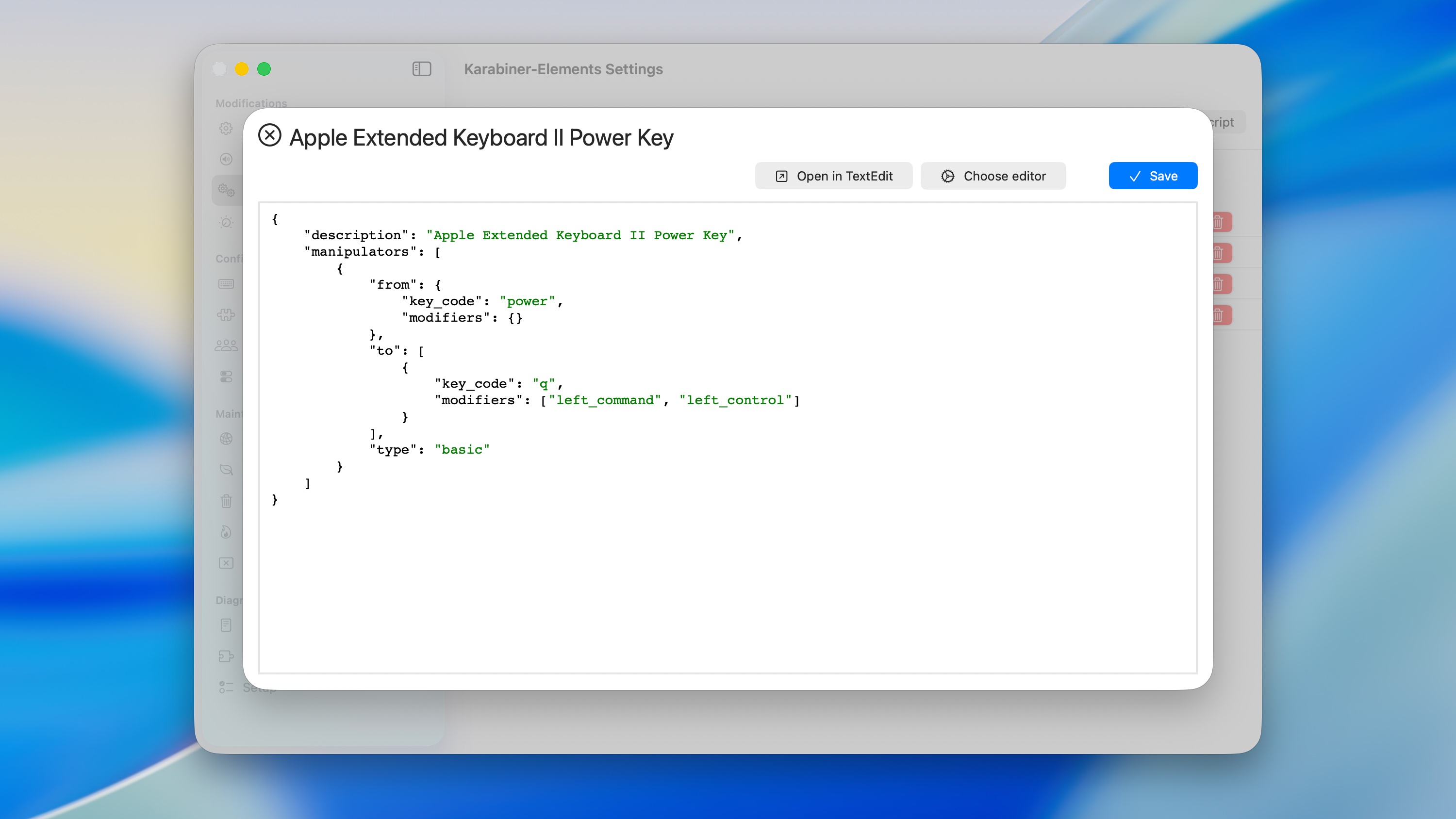 Remap a single key into a multikey shortcut.
Say you want to make a custom keyboard shortcut. Maybe your keyboard has a Fast Forward button, and you want to be able to hit Shift + Fast Forward to Rewind. Maybe you have a PC keyboard, and you want to remap one of the pointless keys, like Insert or Scroll Lock, to something useful, like a key that locks the screen or puts your Mac to sleep.
Go to the Complex Modifications tab in Karabiner Elements and click Add your own rule. It fills the text field with a premade example to help you with the syntax.
For example, in order to remap the Power button on my Apple Extended Keyboard II, I remapped the “power” key to “q” with the “left_command” and “left_option” modifier keys, so that it simulates the ⌃⌘Q keyboard shortcut to lock the screen.
At first, I recommend making one change at a time, so you can figure out how the system works.
There’s a whole community of people who’ve made complex rules that remap the Mac keyboard. You can supercharge navigation in Slack, using the Caps Lock key as a shortcut to jump around and navigate the app faster. There are also presets for popular keyboards, like the Keychron lineup.
In Karabiner Elements > Complex Modifications, click Add predefined rule > Import to open the online directory.
Just click Import next to any rule you want to try out to add it to Karabiner Elements.
More ways to master your Mac| # | Наименование новости | Тональность | Информативность | Дата публикации |
|---|---|---|---|---|
| 1 | 5 overlooked Mac features that save me time every day | 0 | 26.69 | 01-08-2026 |
| 2 | 6 ways to personalize your Mac and make it your own | 0 | 20.8 | 28-05-2026 |
| 3 | This $23 Mac app cleans up storage, speeds up workflows and unlocks hidden tools | 5 | 4 | 19-07-2026 |
| 4 | 6 custom gestures that make my MacBook trackpad even better | 0 | 29.3 | 15-08-2026 |
| 5 | Most beautiful Mac setups: Symmetry, style and serious desk envy | 5 | 3 | 26-06-2026 |
| 6 | 7 mind-blowing Continuity features every Apple user should know | 0 | 24.34 | 12-08-2026 |
| 7 | I tried the viral Mac app that reveals what your USB-C cables can really do [Review] | 0 | 5 | 18-07-2026 |
| 8 | Fed up with iPhone autocorrect? Here’s how to reset it. | 0 | 20 | 10-05-2026 |
| 9 | Still using an Intel Mac? Here are 6 reasons it’s time to upgrade. | 1 | 5 | 27-06-2026 |
| 10 | I love my Logitech mouse, but I finally deleted its bloated Mac app | 0 | 25.64 | 16-08-2026 |