Просмотр новости
Найдите то, что Вас интересует
 Спутники
 РН
РН SpaceX
 Роскосмос
 NASA
NASA
СпутникиРНSpaceXРоскосмосNASA
You can record a phone call on your iPhone. With Apple Intelligence, you’ll get transcriptions of the calls, too, in Notes.
(via Cult of Mac - Your source for the latest Apple news, rumors, analysis, reviews, how-tos and deals.)
You can record a phone call on your iPhone for future reference using a built-in tool. This feature is a great way to refer back to a previous conversation. Who said what? What date did they say? What exactly did you agree to?
If your device supports Apple Intelligence, you’ll get transcriptions of the phone calls, too. They’ll go in a Call Recordings folder in the Notes app.
If you used a shady call recording app before, you can bid it adieu. There’s a convenient button built right into the Phone app. Here’s how it all works.
How to record a call on iPhoneThanks to privacy concerns and a patchwork of state laws, Apple didn’t allow recording phone calls on iPhone for many years after the first device shipped in 2007. In most U.S. states and under federal law, recording a phone call requires the consent of at least one party to the call. Otherwise, it could be considered illegal eavesdropping or wiretapping. About 13 states require the consent of everyone on the call.
Prior to this, Apple did not allow direct recording of iPhone calls. The company still blocks any third-party apps that try to do so. The AI-powered transcription app, Otter.ai, for example, is disabled by iOS from recording when the phone microphone is active.
Some third-party apps can record calls, but not directly. To get around Apple’s restrictions, these apps use workarounds like dialing into a call as a third party. Most are restricted to only U.S. numbers.
It’s not clear why Apple suddenly changed its mind about recording iPhone calls, but it’s a welcome turnabout.
Table of contents: Record a phone call on iPhone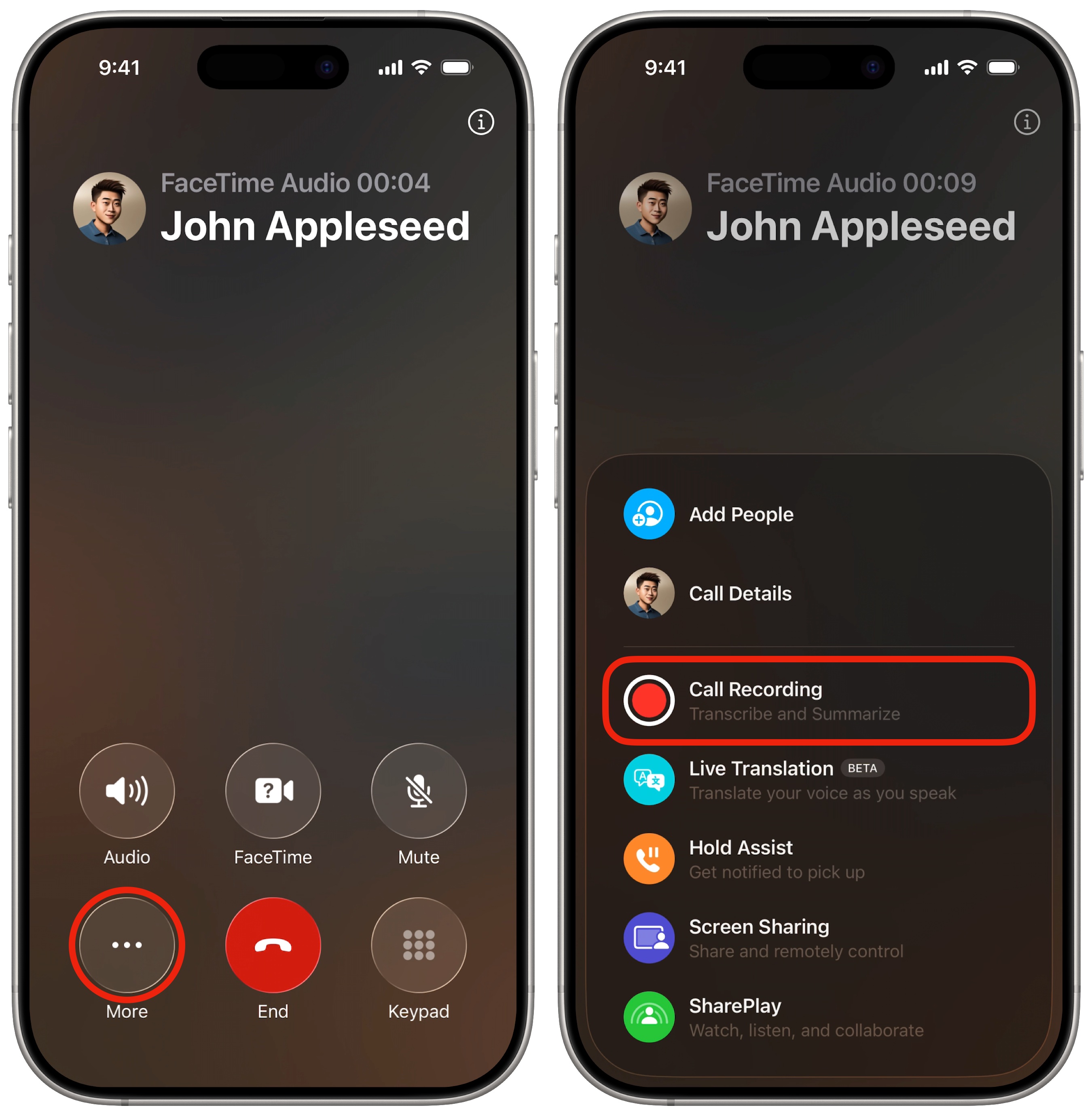 Call recording is hiding behind that pesky More button.
Ready to record a call on your iPhone? From a live phone call or a FaceTime audio call, tap the More button (⋯) in the lower left corner of the screen. Then tap Call Recording. You can start a recording at any time during a call. You’ll see an explanatory screen explaining how this works the first time this happens.
Both people will hear a brief countdown, and the message “This call will be recorded,” followed by a tone.
Afterward, you can find your call recordings in Notes, in the Call Recordings folder.
Take notes on the callThis feature generates a new note for every recorded iPhone call. Tap on the recording toolbar to switch to the Notes app. It’ll take you directly to the note for the phone call currently in progress.
This comes in handy if you need a scratchpad to take down numbers, write about appointments, take meeting notes or remember something important that somebody said.
Where to find your call transcriptions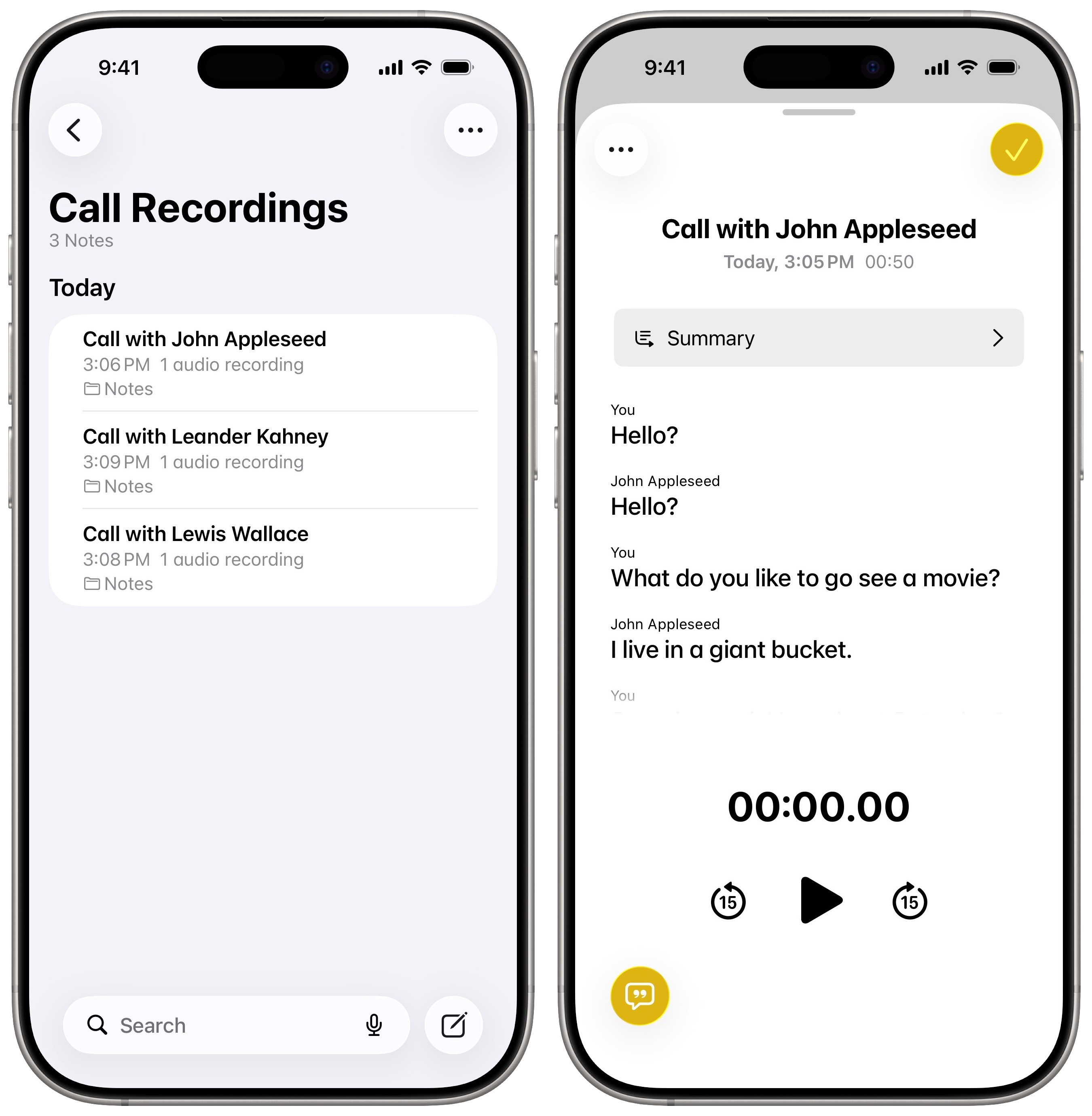 Reread the transcript in Notes.
To see your recorded iPhone calls, open Notes and go to the Call Recordings folder. The audio recording will appear right at the top, above your notes. Tap on it, and you’ll see an interface very similar to the Voice Memos app — with a Show Transcript and Summary button in the bottom left.
Different speakers on the call will be labeled. Just like in Apple Music, you can tap on a sentence to hear that part of the recording. You can also tap Summary at the top to get an Apple Intelligence-generated summary. Tap Done or swipe down to close the recording.
Your iPhone will generate the transcriptions pretty quickly. However, they’re not terribly accurate. Even small Whisper models achieve much better results, especially when it comes to capitalizing proper nouns. Nonetheless, your iPhone call recordings can serve as a handy reference if you need to recall what you said during a call.
More Phone and Messages featuresWe originally published this article on how to record a phone call on iPhone on October 23, 2024. We updated it with the latest information on April 27, 2026.
| # | Наименование новости | Тональность | Информативность | Дата публикации |
|---|---|---|---|---|
| 1 | 8 built-in editing tools to glow up your pictures on your iPhone | 0 | 24.6 | 30-05-2026 |
| 2 | How you can stop the endless madness of iPhone notifications | 0 | 26.24 | 14-05-2026 |
| 3 | How to invite Android and Windows users to a FaceTime call | 0 | 19.67 | 21-04-2026 |
| 4 | How to remove an object from a photo with Apple Intelligence | 0 | 20.8 | 28-04-2026 |
| 5 | Fed up with iPhone autocorrect? Here’s how to reset it. | 0 | 20 | 10-05-2026 |
| 6 | 7 mind-blowing Continuity features every Apple user should know | 0 | 24.34 | 12-08-2026 |
| 7 | I replaced 7 Apple apps on my Mac. Here’s what I use instead. | 0 | 23.22 | 08-08-2026 |
| 8 | Your iPhone can track your medications — here’s how to set it up | 0 | 5 | 20-06-2026 |
| 9 | Check out the best Amazon Prime Day deals on our favorite Apple gear | 5 | 5 | 23-06-2026 |
| 10 | Replace basic voice typing with context-aware dictation for just $59.99 | 0 | 25.68 | 14-08-2026 |